
Keep the project together
Put the edit, the approval and the conversation in one folder. Everyone can pick up where you left off.
 Smol.ai
A workspace for teams and agents
Open the project. Find the next task.
The feedback is in chat. Approval came by email. The cut is in Drive. Give an agent the next step, with the files and conversation to follow through.
Mac beta · Apple Silicon · macOS 12+ · Google sign-in

Put the edit, the approval and the conversation in one folder. Everyone can pick up where you left off.

Ask for the clip worth sharing. Review the cut beside the timestamped source before you pass it on.

Open the project chat or check which personal emails need a reply. Jump back to the original message.
Inside an episode folder
The editor needs the original. A teammate needs a quote. Leave a note on the exact version you reviewed, so the next cut comes with its history.
See the handoff ↗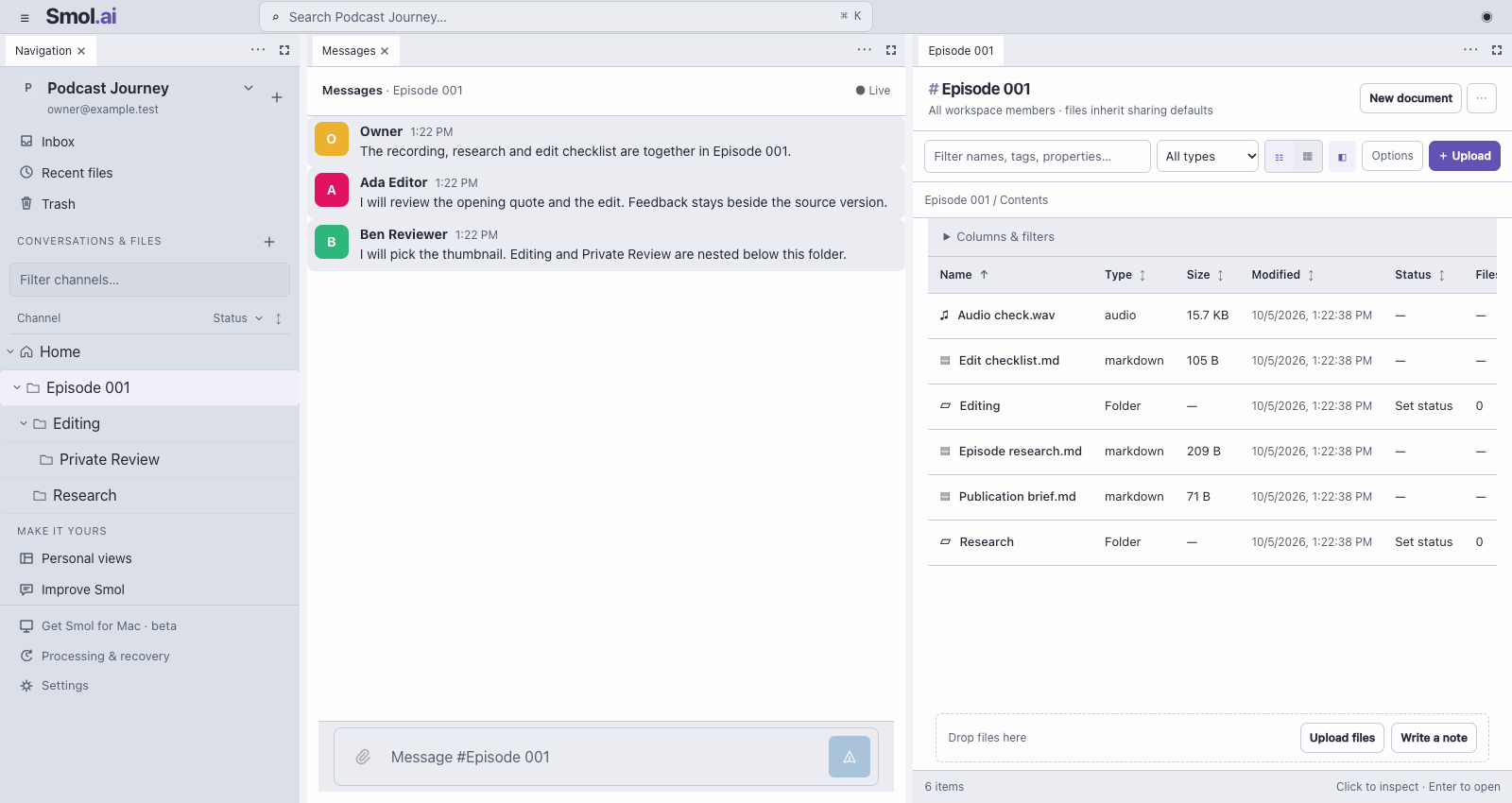
Planned pricing · storage at cost
Keep files and conversation together. Pay for the storage you use.
Plans adjust to fit your archive.
Planned storage passthrough
Storage estimate / month
Storage only; processing extra.
Workspace Business Standard
Team subscription / month
$14/person · annual commitment
Standard
Team subscription / month
$15/person · yearly billing
Adaptive uploads · now live
~2× faster1 GiB · local test
Smol · earlier serial uploaderSmol · adaptive uploader · lower is better
Median wall time across three local runs per mode. Each downloaded file matched its source.
| What matters | Smol | Google Drive | Dropbox |
|---|---|---|---|
| Upload concurrency | SmolAdaptive 1–4 parts across files | Google DriveBrowser: not measured | DropboxBrowser: not measured |
| Connection drops | SmolReselect + resume verified parts | Google DriveResumable API | DropboxResumable API |
| Long interviews | SmolUp to 6 hours* | Google DriveSearchable video transcripts | DropboxUp to 105 minutes |
Smol: planned storage pricing. Drive / Dropbox: annual software subscriptions. *Configured transcription limit.
230 GB × $0.015 / GB-month
USD list prices checked October 5, 2026, before tax or promotions. The calculator upgrades Workspace Standard to Plus and Dropbox Standard to Advanced when more storage is needed. Dropbox Advanced has a three-license minimum; storage assumes active licenses. Beyond these included allowances, an add-on quote is required. It does not model extra seat purchases or negotiated storage add-ons. Smol estimates R2 storage only; requests, AI/compute and billing adjustments are extra. Free-tier credits are excluded. Existing Workspace storage may cost nothing extra, and full bundles can be cheaper per GB.
GB includes originals, versions, backups and previews. Changing the total scales the example breakdown, not retention settings. Billing is planned.
Historical 100 MiB times: Smol 11.7–14.2s, Google Drive 3.9–7.0s, Dropbox 5.7–11.5s. These pre-adaptive timings are two browser uploads per service on one Mac/network, payload start through commit. Accounts differed and repeated bytes may benefit caching. They do not predict your archive’s transfer time. Peer browser concurrency and reload recovery were not measured; resumable APIs are documented capabilities.
Smol now shares an adaptive 1–4-part budget across files, with pause and checkpoint recovery. The bars compare Smol’s earlier serial uploader with its adaptive uploader on the same local fixture, with no added network delay. Each pair has its own time scale. Small batches are 32 × 64 KiB; mixed batches are 40 MiB + 10 MiB + eight 64 KiB files. The full 48-transfer matrix also includes 100 ms added delay per part. Repeated isolated tests improved local wall time 1.36–2.57× across 100 MiB, 1 GiB, small-file and mixed uploads. A fresh 100 MiB live upload reached three concurrent parts and its downloaded hash matched; one run took 19.4 seconds from payload start through commit. These results do not establish a production speed advantage over peers. Smol’s 25 GiB file limit and six-hour media limit are configured ceilings, not maximum-size benchmarks; processing budgets apply.
Full comparison and methodology ↗ Smol.ai